
In CircleLoop, outbound and inbound behaviour can be separated using Teams and routing rules.
This allows:
-
Certain users to dial out from a number
-
Different users (or voicemail) to handle inbound calls
Step 1 – Create a Team for outbound access
Go to:
Admin Settings > Teams > Create a new Team.
Add the users who should be able to dial out from the number to this Team.
Assign the number to this Team in:
Admin Settings > Numbers
Users within this Team will now be able to select this number for outbound calls.
Step 2 – Control inbound call handling
To prevent these users from receiving inbound calls directly, please:
Enable 'Out of Hours' for this Team and set it to Unavailable all day.
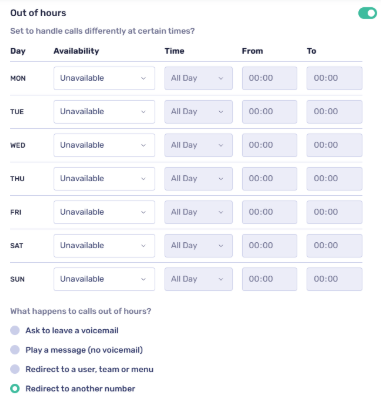
Then choose how calls should be handled:
-
Redirect to another Team - assign this to a second team containing only the users who should answer the inbound calls.
-
Redirect to specific users
-
Redirect to voicemail
-
Redirect to an external number
How this works
This ensures that Users in the first Team can dial out from the number, whilst Inbound calls will follow the routing rules you configure.
If redirected to a subsequent team then only users in the destination Team will receive inbound calls.
Important
Users must be members of the Team that the number is assigned to in order to use it for outbound calls.
Inbound routing is controlled by the Team’s call handling rules.