
We’re excited to welcome you to the CircleLoop Knowledge Base!
The following self-help guides are designed to encourage you to get the most out of CircleLoop. From your initial setup to advanced features, these user-friendly guides will enable you to manage your business communications with confidence.
CircleLoop is a powerful self-managed cloud-based phone system that gives you complete control over how and where calls are received. With intuitive apps for desktop and mobile, CircleLoop ensures you never miss an important call, whether you're in the office or on the move. Delivered entirely from the cloud, CircleLoop is quick to set up, easy to use, and packed with features to support modern, flexible working.
Navigating the CircleLoop Customer Knowledge Base (Desktop, Web and mobile)
Welcome to the CircleLoop Customer Knowledge Base! This resource is specifically designed to assist you in utilising the CircleLoop client on both desktop and mobile devices. Here, you will find demonstrations of the features available for each device, as well as a central hub for downloading the CircleLoop client.
The CircleLoop Knowledge Base is accessible at any time through the CircleLoop application. It is compatible with all modern devices and web browsers.
To locate the Knowledge Base Link on both desktop and mobile devices, simply click (or tap) on your profile icon and then select ‘Help’.
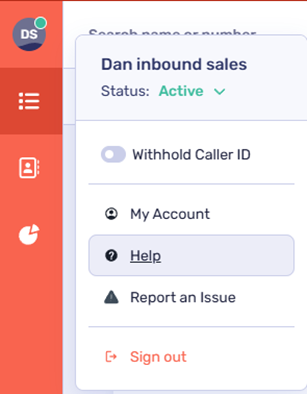
Navigating the Knowledge Base on desktop
The Knowledge Base dashboard is organised into distinct categories. Within each category, you will find articles that serve as training resources specific to that section.

Navigating the Knowledge Base on mobile devices
The mobile version of the CircleLoop Knowledge Base is also split into categories. Swipe up/down on your screen to view these.
To return to the home page/dashboard, tap the ‘X’ icon.
Searching training articles
To find articles on a specific topic, use the search bar located at the top of your dashboard.
As you begin typing, a list of article suggestions will appear in the window below. To see the complete results of your search, click the microscope icon or press ‘Enter’.
Tip! Keep in mind that your search may yield multiple pages of results, so it's beneficial to be as specific as possible in your search queries!
CircleLoop packages
CircleLoop offers flexible packages designed to suit individuals and businesses of any size.
Each subscription includes access to CircleLoop’s full suite of cloud-based communication tools, with no contracts, setup fees, or hidden costs.
Pay As You Go
For smaller teams or light usage.
-
£5 + VAT per user, per month
- Includes 1 UK National/Landline number
(Mobile numbers From £2 / month) -
All CircleLoop features (including call recording, conference calling & voicemail to text)
-
Unlimited inbound calls
-
Outbound UK calls from 3p per minute
-
International calls from 3p per minute
-
SMS from 4p per message
-
No setup or activation fees
Unlimited
For teams and businesses that make frequent calls. If you make more than around 5½ hours of outbound calls per month, the Unlimited plan may work out cheaper than Pay As You Go.
-
£15 + VAT per user, per month
- Includes 1 UK National/Landline number
(Mobile numbers From £2 / month) -
All CircleLoop features (including call recording, conference calling & voicemail to text)
-
Unlimited inbound calls
-
Unlimited outbound calls to the UK, US, Ireland, Australia, New Zealand & Canada
-
International calls from 3p per minute
-
SMS from 4p per message
-
No setup or activation fees
Extras and Add-ons
-
Additional UK Numbers (01, 02, 03 & 07): from £2 + VAT per month, per user
-
VIP Numbers (easy to remember): from £3 + VAT per month, per user
-
Number Porting: free of charge for all users
-
International Calling: rates vary - check current rates via the CircleLoop pricing page
Trial and Flexibility
Tariff changes
Subscriptions can be upgraded or downgraded once per billing cycle.
Trial limitations
All plans include a 7-day free trial - no credit card required.
To avoid any issues setting up your account, please make sure you sign up to CircleLoop using a business email domain.
During your free trial, a small number of features are limited while you test the platform.
Telephone numbers in trial
Trial accounts can have up to 2 numbers in total. This allows you to add one additional number alongside the number created during signup.
Telephone numbers cannot be removed from the account during the trial period.
If you need help adding or removing numbers while in trial, please contact your CircleLoop onboarding agent or the Support team.
Calling and SMS in trial
International calling is not available during the trial period.
SMS is also unavailable during the trial period.
Trial usage limits apply:
-
10 inbound calls
-
30 outbound calls
What happens at the end of the trial
If no payment details have been added, your account will close automatically at the end of the trial.
If you add a payment card, it will be charged on day 7 for one month’s subscription. The amount charged is based on:
-
the number of users on the account & the selected tariffs, and
-
any additional numbers added.
You can cancel your subscription at any point during your trial and you will not be charged.